

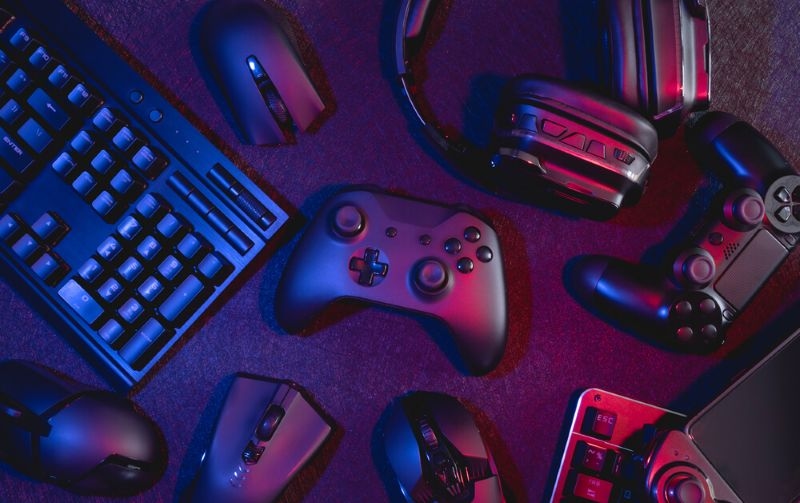
Every gamer has that one moment. The controller dies mid-match. The headset mic crackles right as the team needs a callout. The chair starts feeling like a medieval punishment device. Suddenly, “I’m fine” turns into “Okay, I need to fix my setup.”
That’s where Gaming accessories come in. Not the flashy stuff that looks cool on a desk, but the tools that make gaming smoother, more comfortable, and honestly more fun. The right add-ons can improve reaction time, reduce fatigue, and keep the experience from turning into a constant series of tiny annoyances.
This guide breaks down what’s truly worth having, whether someone plays on PC, console, or switches between both.
Not every accessory is a must-have. Some are nice. Some are pure aesthetics. A few, though, make an immediate difference.
The accessories that matter most usually improve one of these areas:
If a purchase solves a recurring problem, it’s worth it. If it just adds lights, that’s optional. Fun, but optional.
A solid Gaming headset is one of the fastest ways to level up any setup. It’s not just about louder sound. It’s about clearer direction, better detail, and clean communication.
Good gaming audio helps players:
Even casual players notice the difference. And for multiplayer games, a clean mic can save a team from chaos. Nobody likes the teammate who sounds like they’re calling from inside a blender.
When choosing a headset, comfort matters as much as sound. If it squeezes the head like a vise, it’s not a win.
Control is personal. Some players want speed. Some want comfort. Some want a mix.
For PC players, a mouse with a good sensor and comfortable shape can be a game changer. For keyboard fans, tactile preference matters more than brand hype. And for console players, an upgraded controller with better grips or paddles can make certain games feel easier and more responsive.
This is where PC gaming accessories and Console gaming accessories start to look different. PC players often chase precision and customization. Console players often want ergonomics and reliable comfort.
The best upgrade is the one that fits the player’s hands and play style. Not what looks good in a product photo.
Long sessions can quietly wreck posture and hands. If a setup causes tension, performance drops and enjoyment goes down with it.
Comfort-focused accessories include:
A lot of gamers ignore comfort until it hurts. Then they suddenly care a lot. Preventing that is smarter.
This is also a major part of building accessories for a gaming setup that feels good for hours, not just five minutes.
Gamers often focus on hardware specs, but the display is where everything shows up. A better monitor can make games feel smoother and more responsive, especially for fast-paced genres.
Useful display accessories include:
For console players, a good TV setup matters too, especially if the screen has low latency and handles motion well.
Mood lighting is optional, but it can be genuinely nice. The trick is not turning the setup into a disco.
Helpful lighting choices:
If someone streams or records content, lighting becomes more important for camera quality too.
This is the unglamorous stuff that saves the day.
Convenience accessories that many gamers love:
Nothing kills a vibe like a dead controller or a spaghetti mess of cables. Cleaning that up is an underrated win.
On a Similar Note: Exploring Future Trends in Cross-Platform Game Development
If someone plays on PC, a few extras can make the setup feel more “complete.”
Practical PC gaming accessories include:
PC setups can get complex fast, so organization helps. A cleaner space usually means fewer distractions.
Console gaming often happens on a couch, a bed, or a shared living room space. So the accessories are more about comfort and reliability.
Useful Console gaming accessories include:
Console gaming also benefits from a tidy setup. If cables and controllers are always in the same spot, the whole experience feels smoother.
The phrase Best gaming accessories can sound like a shopping list, but it’s really about priorities. Most gamers get the biggest improvement from:
Those solve the most common frustrations. Fancy extras can come later.
A quick self-check question helps:
What is the one thing that annoys you every session?
Fix that first.
That’s how people build a setup that feels tailored, not random.
A great setup is not the one with the most gear. It’s the one that feels effortless.
A smart approach:
That way, Gaming accessories become tools that support the experience, not clutter that gets in the way.
And yes, aesthetic touches are allowed. People should enjoy looking at their setup. Just don’t sacrifice comfort and function for a neon keyboard that hurts to use.
Read More: How to Improve Valorant Communication for Team Wins
A comfortable headset, a reliable controller or mouse, and basic charging and cable organization are the best starters.
Often, yes. PC accessories focus on precision and customization, while console accessories lean toward comfort, charging, and living-room convenience.
Audio and comfort usually give the biggest immediate improvement. A good headset and better posture support can change long sessions completely.
This content was created by AI